Divisible and Conquer (1)

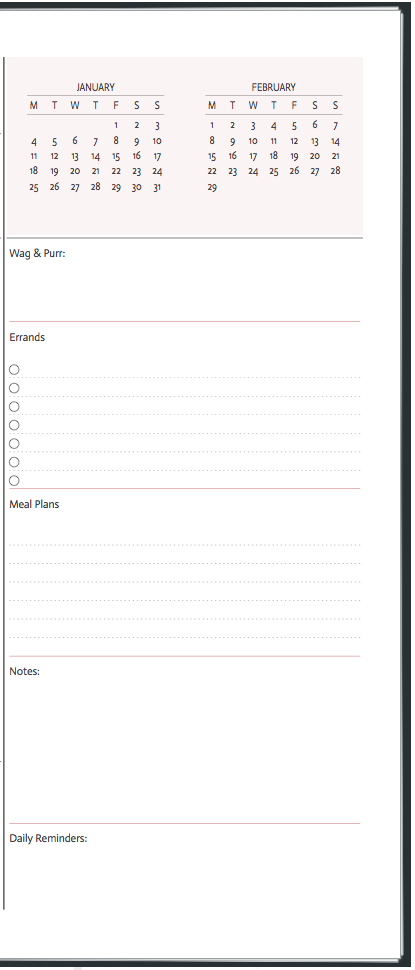
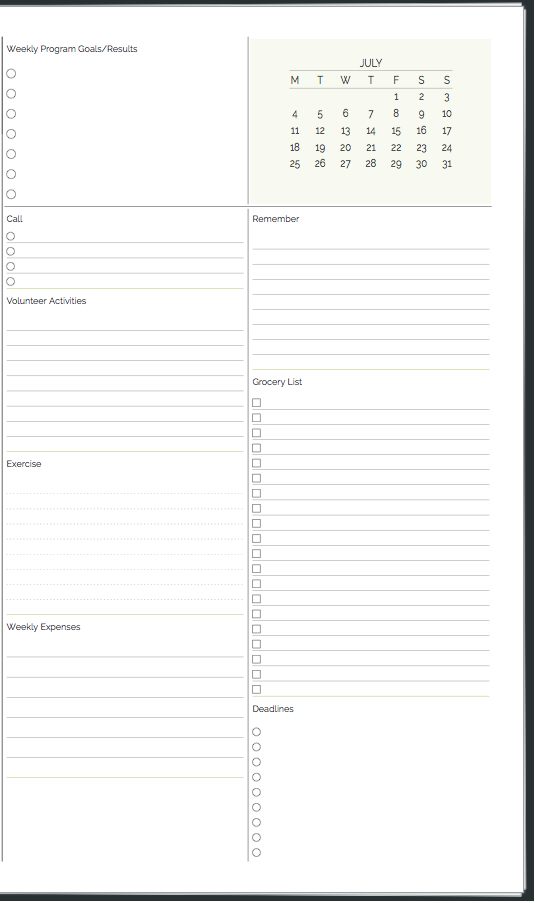
All Agendio planners include Divisibles, which is the name of the space for lists that you can also subdivide as you wish. We are often asked why?

The reason is simple: We all have tasks to do and things to remember that do not belong at a specific time or on a specific day. Todos that you will fit in when you have the chance, tasks you plan to juggle during the week or things to pick up or drop off when you happen to be in the area. Also, things you want to track, project  progress and your children’s activities or your school coourses. And how about one often-overlooked area: Me-Time, because it’s important to carve out time for yourself. One way to do this is to write down in your Divisible things you want to do for yourself so they are not far from the tasks you must do for your job.

Div-1

I don’t understand how some people use planner layouts that do not have enough space for general Todos. We are consistently told by our customers that they actually have more things in their divisibles than in their schedules, and when we ask whether this is new for them, the typical answer is that they always had all these responsibilities and needs, they just didn’t have a good place for them.

Div-4

If you have a busy schedule and you use a planner that consists mostly of schedule pages and limited room for general activities, I would love to hear how you manage and why you don’t miss having that general space to list all that other stuff that you still must get done.

Remember that some tasks are best placed in a divisible initially and then during the week moved to a specific time slot once you know how your week is playing out.

Div-3

If you want to see some more excellent uses of divisibles, check out our Client Customization page, featuring a variety of our customers’ creations. You can access it from the Agendio home page or directly at https://agendio.com/client-customizations

Client Customizations

Every week we have the privilege to look at what our customers have created. It’s fascinating to see each planner’s customized layout and how each one successfully addresses a specific person’s individual requirements with creativity and insight.

Recently, we received a few requests from people asking if we would be willing to show some of our customers’ layouts to help them customize their own layouts, since they were having trouble working through all the options and possibilities. It occurrred to us that if they could benefit from seeing these layouts, so might other site users.

Client Planner

So we added a new section, called Client Customizations, which you can link to from the home page or by going to https://agendio.com/client-customizations/

We selected a bunch of different ones, from which we pick 10 to show you randomly. We hope you enjoy them!


Student Agendios

We receive many requests and suggestions every week and we try to add as many of your requests as we can. However, we do not have any dedicated products for students.

Nonetheless, many students are using their imagination and creativity to customize planners for school. I’d like to share one with you that I thought was well done:

Blog-School

Maybe we should have awards for the best-customized planners?


Does the Week Start with Sunday or Monday?

At Agendio, we don’t know and we don’t care, which is why you can start your planner on whichever day you want, even Wednesday!

And now, you can also start your monthly and weekly planners on different days. Your weekly can start on Monday and your monthly on Sunday or whichever day you prefer. Simply select each of your start days on the first (info) screen of the builder.

Different Start Days

So does the week start on Sunday or Monday? Apparently it can now do both at the same time!

Activities: Weekly or monthly?

Some of you have mentioned that you don’t need to see your activities in your monthly pages and you would prefer to keep the space for other events.

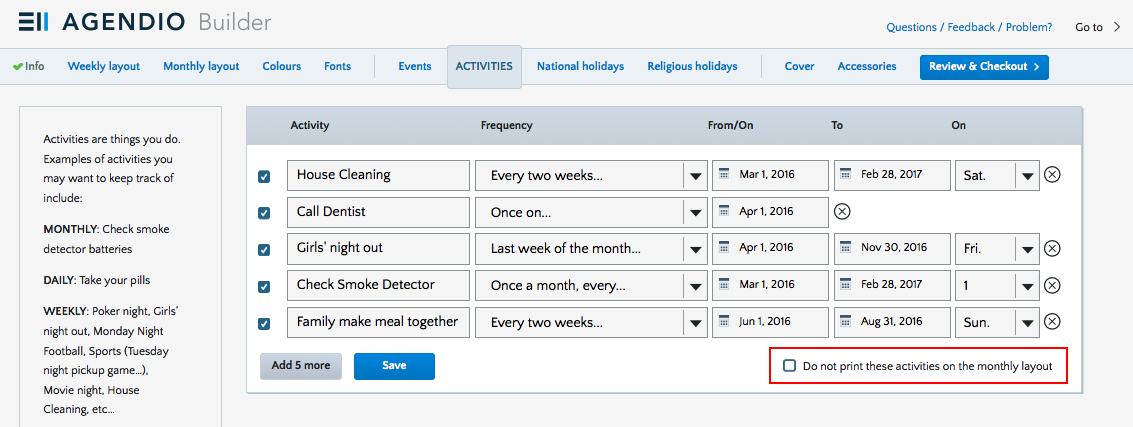
So we’ve added a new option for our customizable Weekly-Monthly planners: Now, if you choose to, you can print your activities only on your weekly pages, not on your monthlies.

Activities not in monthly

You’ll find the checkbox just to the right of the activities save button.

One of these things is like the others

Suppose you have five items to add to your planner:
– Your meeting with a senior manager.
– Calling to make a reservation for supper in two weeks;
– Preparing for your presentation for the quarterly meeting;
– The big yearly sale at your favourite store;
– Picking up your teenage daughter downtown at night.

Is there any difference in how you should write these in your planner? Are any of them similar or different? How would you list them?

Meeting with the manager of the company is at a specific time and you should be punctual, so it should be listed as a task at a specific time on that day and highlighted or emphasized.

Calling to make a reservation for supper in two weeks is not particularly specific as to time as long as it’s done soon, so it would be best placed in a more general task area.

The presentation for the quarterly meeting will require many days of work, so you should have a way to block off time on many days for this task.

Why Customizable Planners?

We rely on our planners to organize our days and our weeks, highlight our tasks, assemble our to-do lists, track our progress and record important details. The more organized our planners are, the more organized we are. But how can we be optimally organized if the tool we use to stay efficient does not suit our individual needs?

That, in one paragraph, is why customizable planners.

Most planners have similar layouts, so you must adapt to your planner. That’s backwards! And that’s why Agendio was created, to create an ever-growing selection of customizable planners.

This blog will focus on all things planner and customizable, as well as some general planner/planning topics. We will look at how we plan and manage our planners and whether there are any more rewarding approaches. I hope it will be informative, entertaining, maybe a little educational. If we are even a little successful, we may shine a light on some new ways of thinking about planners and the planning process.

And if you have questions you would like the blog to address or suggestions for topics, please don’t be shy and send them in.

Finally, to everyone who has purchased an agendio since our launch, a sincere thank you for your trust and your kind comments.

Dan

Page 19 of 19

Powered by WordPress & Theme by Anders Norén