Category: Planning

Does the Week Start with Sunday or Monday?

At Agendio, we don’t know and we don’t care, which is why you can start your planner on whichever day you want, even Wednesday!

And now, you can also start your monthly and weekly planners on different days. Your weekly can start on Monday and your monthly on Sunday or whichever day you prefer. Simply select each of your start days on the first (info) screen of the builder.

Different Start Days

So does the week start on Sunday or Monday? Apparently it can now do both at the same time!

Activities: Weekly or monthly?

Some of you have mentioned that you don’t need to see your activities in your monthly pages and you would prefer to keep the space for other events.

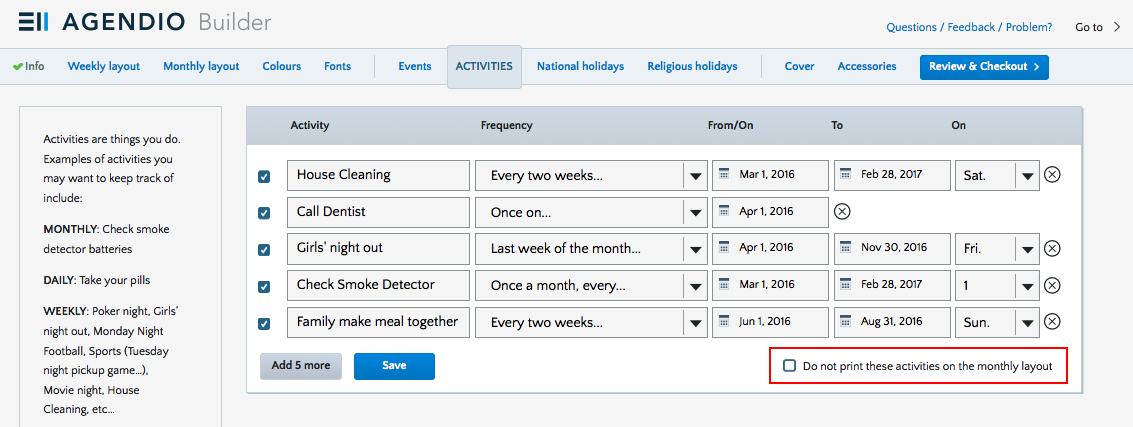
So we’ve added a new option for our customizable Weekly-Monthly planners: Now, if you choose to, you can print your activities only on your weekly pages, not on your monthlies.

Activities not in monthly

You’ll find the checkbox just to the right of the activities save button.

One of these things is like the others

Suppose you have five items to add to your planner:
– Your meeting with a senior manager.
– Calling to make a reservation for supper in two weeks;
– Preparing for your presentation for the quarterly meeting;
– The big yearly sale at your favourite store;
– Picking up your teenage daughter downtown at night.

Is there any difference in how you should write these in your planner? Are any of them similar or different? How would you list them?

Meeting with the manager of the company is at a specific time and you should be punctual, so it should be listed as a task at a specific time on that day and highlighted or emphasized.

Calling to make a reservation for supper in two weeks is not particularly specific as to time as long as it’s done soon, so it would be best placed in a more general task area.

The presentation for the quarterly meeting will require many days of work, so you should have a way to block off time on many days for this task.

Page 7 of 7

Powered by WordPress & Theme by Anders Norén